


DSers for New Dropshippers: Master the Product Mapping Feature (Why & How)


As a New Dropshippers, the DSers product mapping feature is a total game-changer—one of the most underrated tools for streamlining your order fulfillment and avoiding messy manual work.
If you’re tired of the thought of matching your store’s products to your AliExpress/Temu/Alibaba suppliers one by one for every order, mapping solves this problem in a few simple clicks.
This guide breaks down why you need DSers mapping and the basic steps to use it to connect supplier products to your store’s listings—no advanced skills required, just straightforward, friendly actions.
1. Why We Must Use the DSers Mapping Feature
Mapping isn’t just a “nice-to-have”—it’s a foundational DSers tool that eliminates the biggest fulfillment headaches for new dropshippers. Here’s why it’s non-negotiable:
· Automates order fulfillment: No more manually searching for the exact supplier product for every customer order—DSers auto-matches your store’s product to the supplier’s listing instantly.
· Eliminates human error: Avoid sending the wrong product/variant (e.g., a red mug instead of a blue one) by locking in exact supplier-product matches.
· Saves massive time: Skip repetitive supplier searches for every order; mapping does the work for you, even as your store grows.
· Syncs critical details: Maps supplier pricing, variants (sizes/colors), and inventory to your store’s products—so you never sell out-of-stock items.
· Works for all DSers-supported platforms: Map products from AliExpress, Temu, and Alibaba to your Shopify/WooCommerce/Wix… store seamlessly.
In short, mapping turns chaotic manual fulfillment into a fully automated process—essential for new dropshippers who want to focus on growing their store, not tedious admin.
2. How to Use the DSers Product Mapping Feature (General Steps)
DSers basic mapping is intuitive and takes just a few minutes to set up—no complex settings or technical know-how. Start with this core workflow for single products (the best place for newbies to begin):
Pre-Requisite
Ensure your store is connected to DSers, and you have live products on your store (pushed from DSers or added directly) and your preferred supplier platforms (AliExpress/Temu/Alibaba) linked.
General Mapping Steps
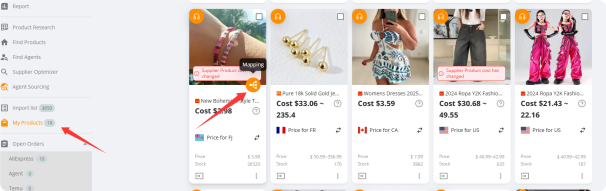
1. Get into DSers-My Products page and click the mapping button for products (labeled clearly for easy access).
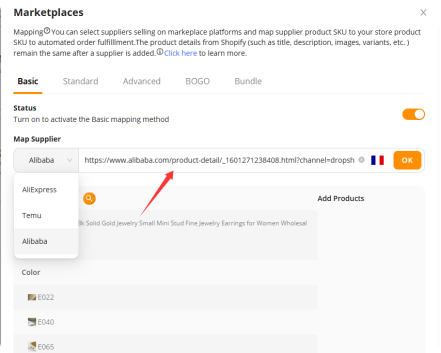
2. Select your target supplier platform (AliExpress for beginners, Temu for low-cost products) from the top dropdown menu. And enter the product URL. Click “OK” button.
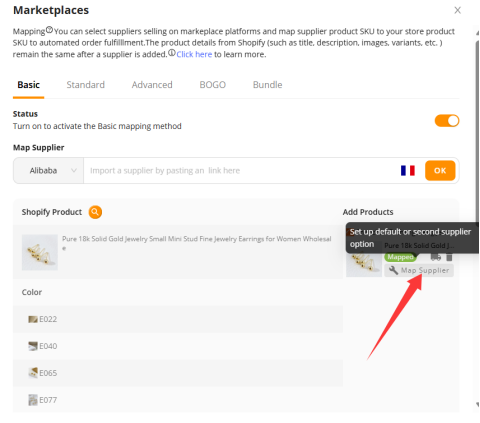
3. Click the Map button next to the correct supplier product—DSers will confirm the mapping is complete with a pop-up.
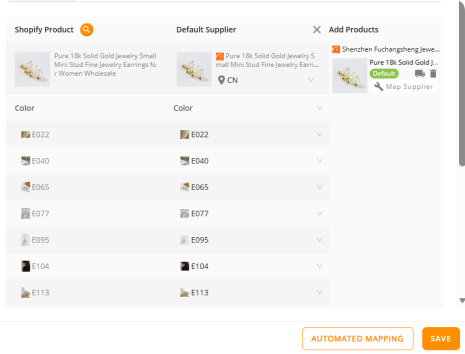
4. Confirm it and then you can try to apply all variants one by one.
5. Repeat for all your store’s core products (start with 3-5 bestsellers as a new Dropshipper!).
That’s it—basic mapping is a one-time setup for each product, and DSers saves the match forever (you can edit or remap later if needed).
Key New Dropshippers Note for the Example
Always match exact product variants (sizes, colors, specs) when mapping! If your store sells the charger in black and white, map to a supplier product that offers the same two variants—this avoids fulfillment mix-ups.
Quick Pro Tips for DSers Basic Mapping (For New Dropshippers)
· Start small: Map only your top 3-5 store products first—don’t overwhelm yourself with mapping every listing at once.
· Remap easily: If a supplier runs out of stock or raises prices, use the Remap button in the DSers Mapping tab to switch to a new supplier product in seconds.
· Check mapping status: The DSers Mapping tab labels products as “Mapped” or “Unmapped”—use this to stay organized.
· Stick to trusted suppliers: Only map to 4.5+ star suppliers with fast shipping (avoids customer complaints and refund requests).
·
Final Thoughts for New Dropshippers
The DSers product mapping feature is your first step to automating your dropshipping business—and it’s the easiest automation tool to master as a newbie. By taking 5 minutes to set up basic mapping for your core products, you eliminate manual order fulfillment work, cut down on errors, and free up time to focus on what matters: marketing your store and finding new winning products.
DSers mapping grows with you, too—once you master the basics, you can move to bulk mapping for multiple products or variant-specific mapping for complex listings. For now, stick to the simple steps in this guide, and you’ll have a fully mapped, automated fulfillment system in no time.


 Company
 Why Choose DSers
 Blog
Blog
 Help Center


 Live Chat
