


What Is the DSers “Import List”? Why It Matters After Finding Products & How to Use It


When running a dropshipping business with DSers, many beginners focus only on finding products. But the real difference between a messy store and a professional store often comes from what you do after finding a product.
That’s where the Import List comes in.
This feature connects product discovery to store launch. If you skip it or use it incorrectly, your store may look unprofessional, your margins may be wrong, and your fulfillment may become risky.
Let’s break it down step by step.
Click here to start dropshipping now with DSers
What Is the “Import List” in DSers?
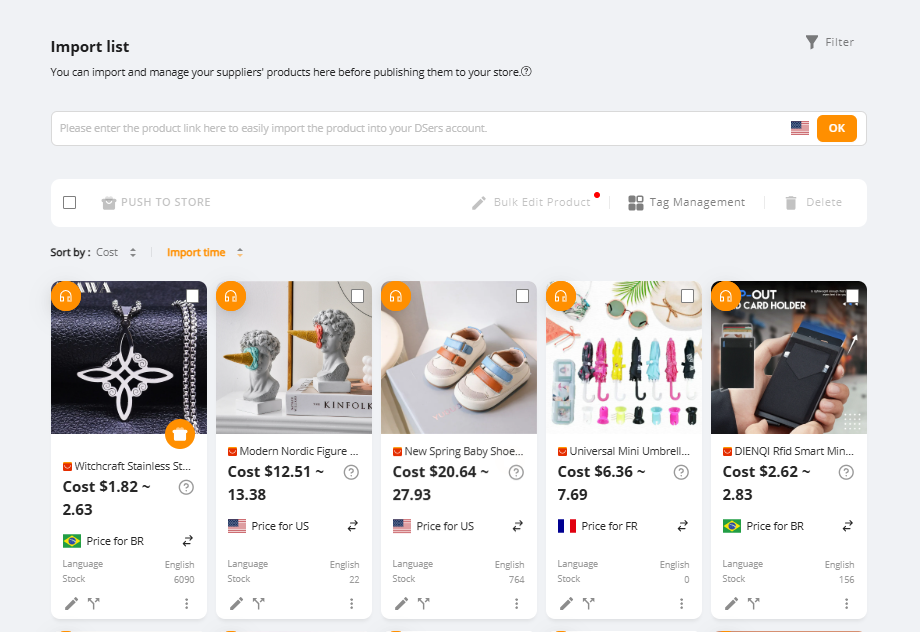
The Import List is a preparation area where products are edited and optimized before being published to your store.
Think of it as a workspace between product research and store launch.
Instead of pushing supplier products directly to Shopify, DSers lets you:
- Edit product titles and descriptions
- Adjust pricing
- Choose suppliers
- Fix variants
- Optimize images
- Prepare branding
Only after that do you push products live.
So Import List is like a quality-control checkpoint for your store.
Connection Between “Find Products” and “Import List”
Inside DSers, the normal workflow is:
Find Products → Add to Import List → Edit & Optimize → Push to Store
Let’s explain the logic.
Step A — Find Products
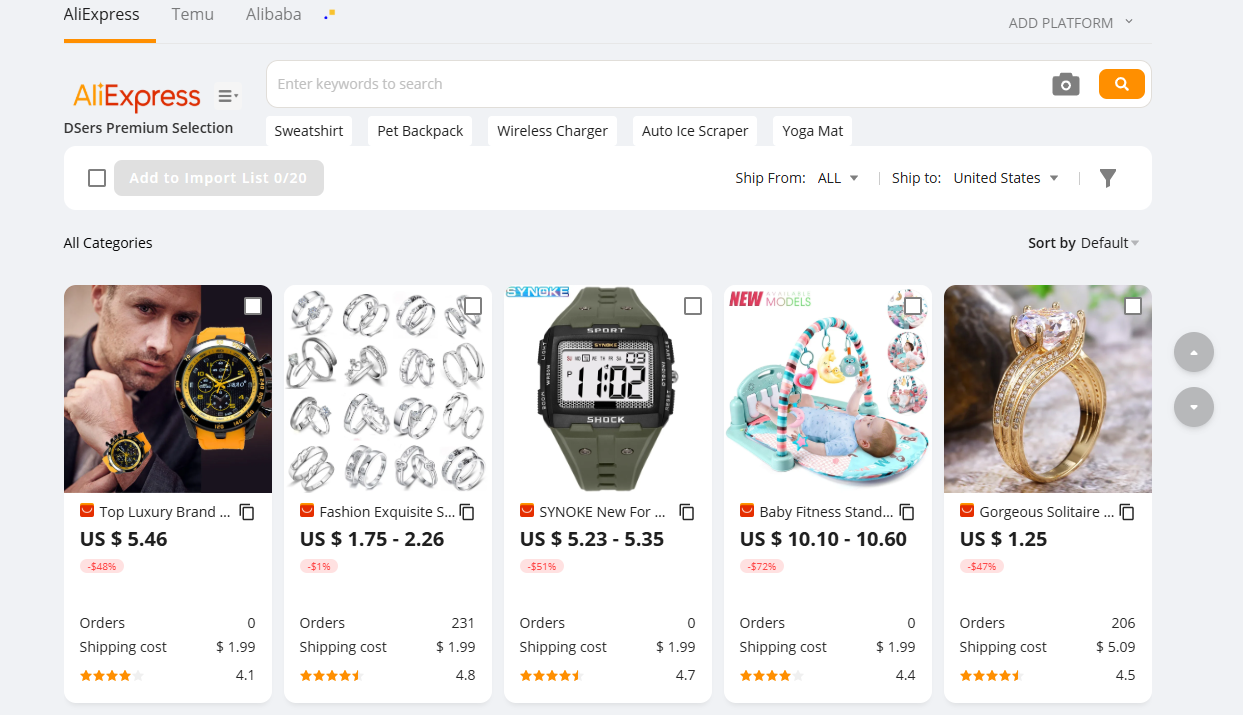
When you use “Find Products,” you locate:
- A product idea
- A marketplace listing
- A supplier store
At this point, you only have raw supplier data.
The product is NOT ready to sell yet.
Step B — Import List
When you click “Add to Import List,” you are telling DSers:
👉 “I want to prepare this product for my store.”
Now you can modify everything before customers see it.
This connection is very important.
Find Products = Discovery
Import List = Preparation
Skipping Import List is like opening a restaurant with raw ingredients but no cooking.
Why You Must Use Import List
There are several important reasons.
✅ Reason 1 — Clean Supplier Content
Supplier listings often have problems like:
- Long messy titles
- Poor English descriptions
- Wrong variant names
- Low-quality formatting
If you publish directly, your store looks cheap.
Import List lets you rewrite everything in your own style.
This improves trust and conversion rate.
✅ Reason 2 — Set Correct Pricing Before Selling
Profit is critical in dropshipping.
In Import List, you can apply pricing rules such as:
- Percentage markup
- Fixed profit per product
- Different pricing strategies
This ensures you never launch a product with bad margins.
✅ Reason 3 — Check Supplier Quality
After importing, you can still use Supplier Optimizer to compare suppliers.
Maybe another store offers:
- Faster shipping
- Better price
- Higher rating
Better supplier choice leads to smoother fulfillment.
✅ Reason 4 — Fix Product Variants
Many supplier products have confusing options.
Example:
- Size + color mixed together
- Duplicate options
- Wrong names
In Import List, you can:
- Rename variants
- Remove unnecessary options
- Simplify product choices
This reduces customer confusion and wrong orders.
✅ Reason 5 — Prepare a Product Testing Pipeline
Professional dropshippers don’t test one product at a time.
They prepare many products inside Import List and launch them step by step.
Import List helps you:
- Save multiple product ideas
- Organize products by niche
- Prepare seasonal launches
- Build backup products
This makes testing faster and more structured.
Click here to start dropshipping now with DSers
How to Use Import List Step by Step
Here’s a practical workflow.
Step 1 — Find Product
Use Product Research or Find Products.
Step 2 — Add to Import List
Click “Add to Import List.”
Now the product is saved in DSers.
Step 3 — Edit Product Information
Inside Import List, adjust:
- Product title
- Description
- Images
- Variants
- Pricing
Make the product look like your own brand.
Step 4 — Optimize Supplier
Use Supplier Optimizer to compare suppliers and choose the best one.
Check shipping speed and rating.
Step 5 — Push to Store
When ready, click “Push to Store.”
Now your product appears in Shopify or your ecommerce platform.
When Import List Becomes Even More Important
As your business grows, Import List becomes your product management center.
It helps you:
- Launch products faster
- Prepare new products weekly
- Manage multiple niches
- Plan holiday campaigns
- Organize winning product backups
Advanced sellers often keep dozens of prepared products inside Import List.
Common Beginner Mistakes
Avoid these mistakes:
❌ Publishing raw supplier products
❌ Ignoring variant setup
❌ Forgetting pricing rules
❌ Not checking supplier reliability
❌ Testing too many products without preparation
Using Import List properly prevents all of these.
How Import List Helps Your Business Scale
Import List supports growth in several ways.
Better Product Pages
Cleaner titles and images increase conversions.
Better Profit Control
Correct pricing protects margins.
Better Fulfillment
Supplier checks reduce delivery problems.
Faster Testing
Prepared products allow quick launches.
All of these lead to smoother scaling.
Final Thoughts
The Import List in DSers is not just a storage area—it’s a critical preparation step between finding products and launching them.
Find Products helps you discover opportunities.
Import List helps you turn those opportunities into professional product listings.
If you want consistent results in dropshipping, never skip this step.
| Get Started Now to Grow Your Online Business with the Best AliExpress Dropshipping Tool - DSers! |



 Company
 Why Choose DSers
 Blog
Blog
 Help Center


 Live Chat
