


DSers for New Dropshippers: Full Order Processing & Tracking Guide


As a new dropshipper, mastering DSers’ order processing and tracking is key to running a smooth, low-hassle business.
DSers automates the entire workflow from when a customer order lands in your store to fulfillment and tracking back-and-forth with suppliers required.
This guide breaks down the complete general steps for DSers order processing and how to track fulfilled orders in the platform, with simple bullet points and friendly logic. All steps work for DSers’ supported supplier platforms (AliExpress, Temu, Alibaba) and connected stores (Shopify, WooCommerce, Wix, etc.).
Pre-Requisite for Seamless Order Processing
Before starting, confirm these quick setup steps (already done if you’ve imported/pushed products):
· Supplier products are mapped to your store products (critical for auto-matching!)
· The orders have been synced to DSers Open orders tab already.
1. Full General Steps to Process Orders in DSers (From Pending to Fulfillment)
DSers automatically pulls customer orders from your connected store—you won’t need to enter order details manually. Below are the core end-to-end steps to process and fulfill orders:
Step 1: Sync orders from your store to DSers
· Customer places and paid an order on your store → DSers syncs the order in real time to your DSers Open Orders tab.
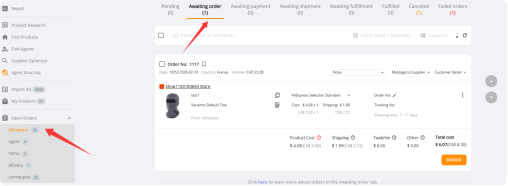
· Review unprocessed orders: Check customer shipping info, product variants (size/color).
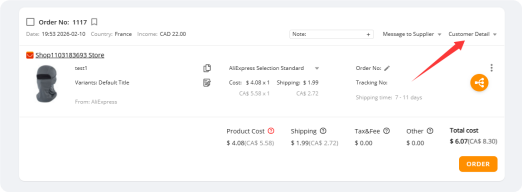
Step 2: Place the order(s) from DSers to your supplier(s)
· Select the unprocessed order(s) (check the box for single/bulk processing)
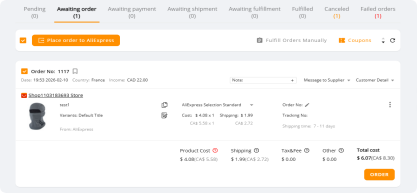
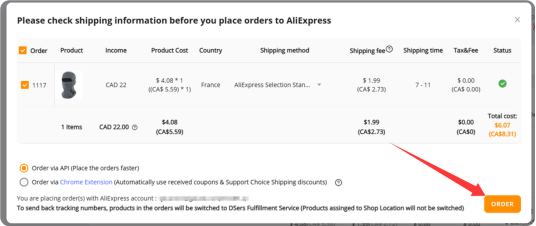
· Click Order button → DSers auto-matches your store product to the mapped supplier product (thanks to your product mapping setup!)
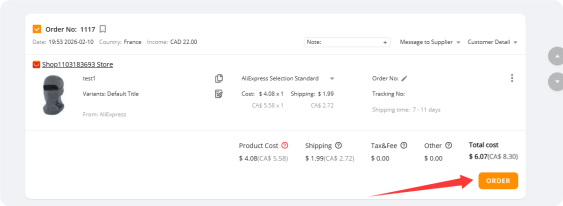
· Confirm the supplier product, price, and shipping method (stick to pre-selected options for beginners)
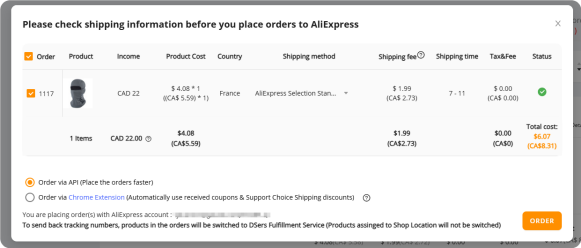
· Click Order button → order moves to the Awaiting Payment status in DSers
Step 3: Pay the Supplier & Submit the Order
· In the Awaiting Payment section, select the prepared order(s)
· Click Make Payment → DSers redirects you to the supplier’s platform (AliExpress/Temu/Alibaba) with the order pre-filled (no manual data entry!)
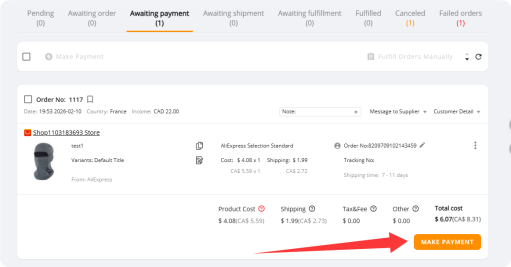
· Complete payment to the supplier via the platform’s checkout (credit card, PayPal, etc.)
· After payment, return to DSers → the order status updates to Awaiting Shipment (DSers syncs payment confirmation automatically)
Step 4: Supplier Fulfills the Order
· The supplier receives the order from DSers → they pack, ship, and generate a tracking number
· DSers syncs the supplier’s fulfillment progress in real time and send back to your store automatically → order status updates to Fulfilled once shipped
That’s the full workflow! For new dropshippers, start with single order processing to get comfortable, then use bulk processing for multiple orders to save time.
2. How to Track Fulfilled Orders in DSers (2 Simple Methods)
Once an order is marked Fulfilled in DSers, the platform auto-syncs the supplier’s tracking number and shipping details—no need to chase suppliers for updates. You can track orders for your own records and share tracking info with customers.
Core Key Features
· Real-time auto-sync: Pulls live shipping statuses (in transit, out for delivery, delivered) and tracking numbers directly from suppliers, updating instantly in your DSers Tracking status page as carriers scan packages.
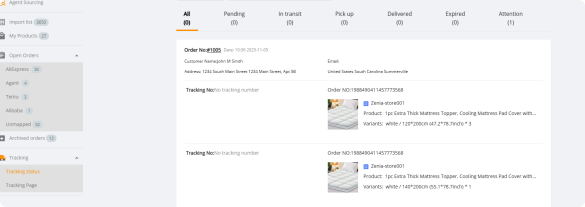
· Unified tracking hub: All tracking details, carrier info, and order statuses live in the DSers Tracking Status tab— Once you have paid for the orders to suppliers DSers will sync the orders in this tab automatically.
· Clear status labeling: Orders are tagged with simple, auto-updating labels (Awaiting Fulfillment, Fulfilled, Delivered) for at-a-glance oversight of every order’s progress.
· Flexible viewing: Check tracking for single orders (full shipping details) or bulk-view all fulfilled orders; export CSV tracking data for easy record-keeping.
· Cross-platform compatibility: Works seamlessly with all DSers-supported supplier platforms (AliExpress, Temu, Alibaba) and store integrations with no extra setup.
Seamless Workflow Integration
This feature activates automatically with basic DSers setup (store/supplier connection + product mapping): once a supplier ships an order and generates a tracking number, DSers auto-pulls the data, marks the order Fulfilled, and syncs all tracking details to your store instantly. It continues updating the shipping status in real time until the package is delivered—all visible in one simple dashboard.
Big Benefits for Dropshipping
Save time on manual tracking checks, reduce data entry errors, boost customer satisfaction with 24/7 shipping visibility, and gain simple, centralized order oversight—all with no technical skills required. The DSers Tracking Status feature is your one-stop solution for hassle-free dropshipping order tracking.


 Company
 Why Choose DSers
 Blog
Blog
 Help Center


 Live Chat
