


DSers Settings Guide With Comparison Sheets (Free vs Paid Plans)


When starting with DSers, beginners often ask:
What settings must be configured first?
What can wait until orders arrive?
Which settings need paid plans?
This optimized guide includes clear comparison sheets, so you can set up DSers quickly and correctly.
1. DSers Settings Overview
DSers settings are grouped into 3 practical categories:
1️⃣ Must-Have Before First Order
2️⃣ Set When You Start Getting Orders
3️⃣ Advanced Settings (Scaling Stage)
Understanding this saves time and avoids confusion.
2. Comparison Sheet: What Settings to Configure First
Setting Category | Must Before Orders | Can Wait Until Orders | Scaling Stage |
Pricing Rules | ✅ Yes | ❌ No | Improve later |
Notifications | ✅ Yes | ❌ No | Improve later |
Push Product Settings | ✅ Yes | ❌ No | Improve later |
Shipping Settings | ❌ No | ✅ Yes | Optimize later |
Tracking Page Branding | ❌ No | ✅ Yes | Important later |
Supplier Optimizer | ❌ No | ❌ No | ✅ Yes |
3. Essential Settings Before First Order
These are the only settings beginners must do first.
3.1 Pricing Rules
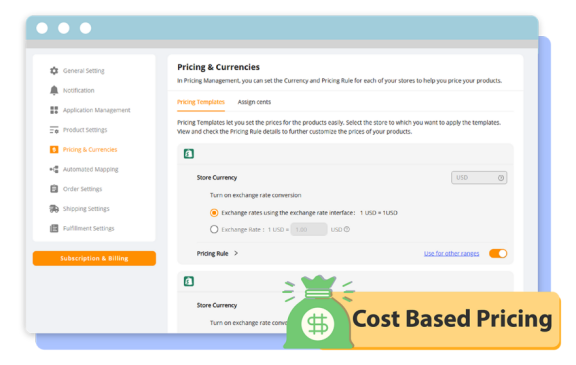
Set automatic pricing to avoid losses.
Example pricing rule:
• Cost $5 → Sell $14.99
• Cost $10 → Sell $24.99
Set:
✔ Markup %
✔ Fixed markup
✔ Rounding rule
This protects your profit.
3.2 Notification Settings
Enable alerts for:
✔ Failed orders
✔ Supplier price changes
✔ Out-of-stock products
This prevents customer complaints.
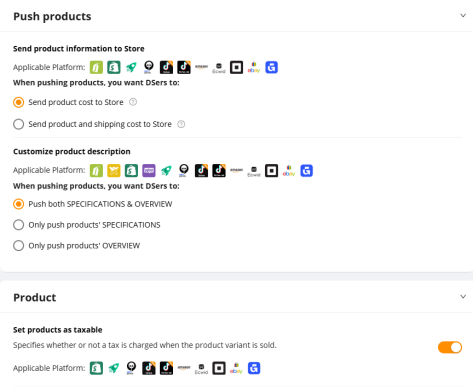
3.3 Push Product Settings
The system has already set default
4. Settings You Can Skip Until Orders Come
Many beginners over-optimize too early.
You can safely skip these until you get sales.
4.1 Shipping Settings
You only need shipping settings when placing real orders.
Configure later:
✔ Preferred shipping method
✔ Default shipping country
✔ Shipping time filters
DSers will guide you during order placement.
4.2 Tracking Page Branding
Tracking pages matter after shipping products.
Configure later:
✔ Logo
✔ Brand color
✔ Upsell products
Great for customer experience, not urgent.
4.3 Automation Rules
Advanced automation like:
✔ Auto place orders
✔ Auto update prices
✔ Auto supplier mapping
Use after you understand your workflow.
5. Comparison Sheet: Free Plan vs Paid Plans
Here’s the most important comparison beginners need.
Feature | Free Plan | Advanced Plan | Pro Plan | Enterprise |
Store Connection | 3 stores | 10 stores | 25 stores | 50 stores |
Product Import | ✅ | ✅ | ✅ | ✅ |
Manual Orders | ✅ | ✅ | ✅ | ✅ |
Bulk Orders | ✅ | ✅ | ✅ | ✅ |
Pricing Rules | Basic | Advanced | Advanced | Custom |
Tracking Branding | ❌ | ✅ | ✅ | ✅ |
Dedicated Support | ✅ | ✅ | ✅ | ✅ |
6. Quick Beginner Setup Checklist
Before launching ads, check:
✔ Store connected
✔ Supplier connected
✔ Pricing rules set
✔ Notifications enabled
✔ Product pushed to store
That’s enough.
Everything else can wait.
7. Common DSers Settings Mistakes
Avoid these beginner errors:
❌ Setting complicated automation early
❌ Ignoring pricing rules
❌ Wrong currency settings
❌ Spending hours on shipping rules before orders
Focus on product testing first.
8. When Should You Upgrade DSers?
Upgrade when manual work becomes painful.
Examples:
• Many orders need to process per day
• Need multiple stores
• Too much products need to sync stocks
• Supplier switching often
Until then, the free plan works perfectly.
Final Thoughts
You don’t need perfect DSers settings on day one.
Focus on essentials:
✔ Account connection
✔ Pricing rules
✔ Notifications
Then improve settings as your orders grow.
Dropshipping success comes from testing products first, optimizing systems later.


 Company
 Why Choose DSers
 Blog
Blog
 Help Center


 Live Chat
