


How to Connect Your Store and AliExpress Account to DSers (Beginner Step-by-Step Guide)


Complete onboarding tutorial for first-time dropshippers
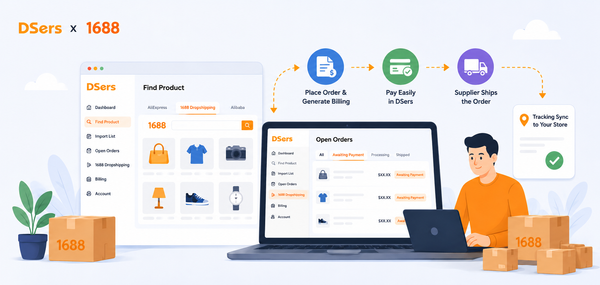
DSers helps ecommerce sellers connect their store with sourcing platforms such as AliExpress, 1688.com, Alibaba.com and other DSers ecommerce integration, then manage product import, supplier mapping, bulk order processing, and tracking synchronization in one workflow. In this guide, we focus on the AliExpress connection because it is usually the first setup step for many new DSers users.
Connecting your store and AliExpress account allows DSers to work as the bridge between your sales channel and supplier-side fulfillment. Once the setup is complete, you can import products, map products to suppliers, find better suppliers, place orders more efficiently, and sync tracking numbers back to your store.
Without proper binding:
- Products won’t import
- Orders won’t sync
- Tracking won’t update
- Automation won’t work
This guide shows exactly how to connect your store and your AliExpress account step-by-step, using real beginner logic.
We’ll also explain common mistakes, troubleshooting tips, and best practices so you don’t get stuck.
Click here to start dropshipping now with DSers
1. Why Binding Is the First Step in Dropshipping
Before DSers can help automate your dropshipping workflow, your store and sourcing account need to be connected correctly. Your store is where customers place orders, your AliExpress account is where supplier-side orders are processed for this workflow, and DSers connects both sides so product, order, and tracking information can move through one system.
In this guide, we use the Shopify-to-AliExpress setup as the main example of our AliExpress dropshipping service because it is one of the most common first workflows for new DSers users.
2. Before You Start: Quick Preparation Checklist
Before binding accounts, prepare:
✅ Required Accounts
- Shopify store (active plan)
- AliExpress buyer account
- DSers account
✅ Recommended Tools
- Chrome browser
- Gmail account
- Stable internet
✅ Store Basics Ready
- Currency chosen
- Payment gateway set
- Store not password-locked
Binding works best when store basics are ready.

|
Connect supply platform, start business DSers supply platform - One click to filter out the most proper suppliers for your products |
3. Part 1 — How to Connect Your Store to DSers
Let’s start with your sales store. Take DSers Shopify dropshipping service as example. If you are using Wix dropshipping service or WooCommerce dropshipping service, they are with the similar process
Step 1 — Install DSers from Shopify App Store
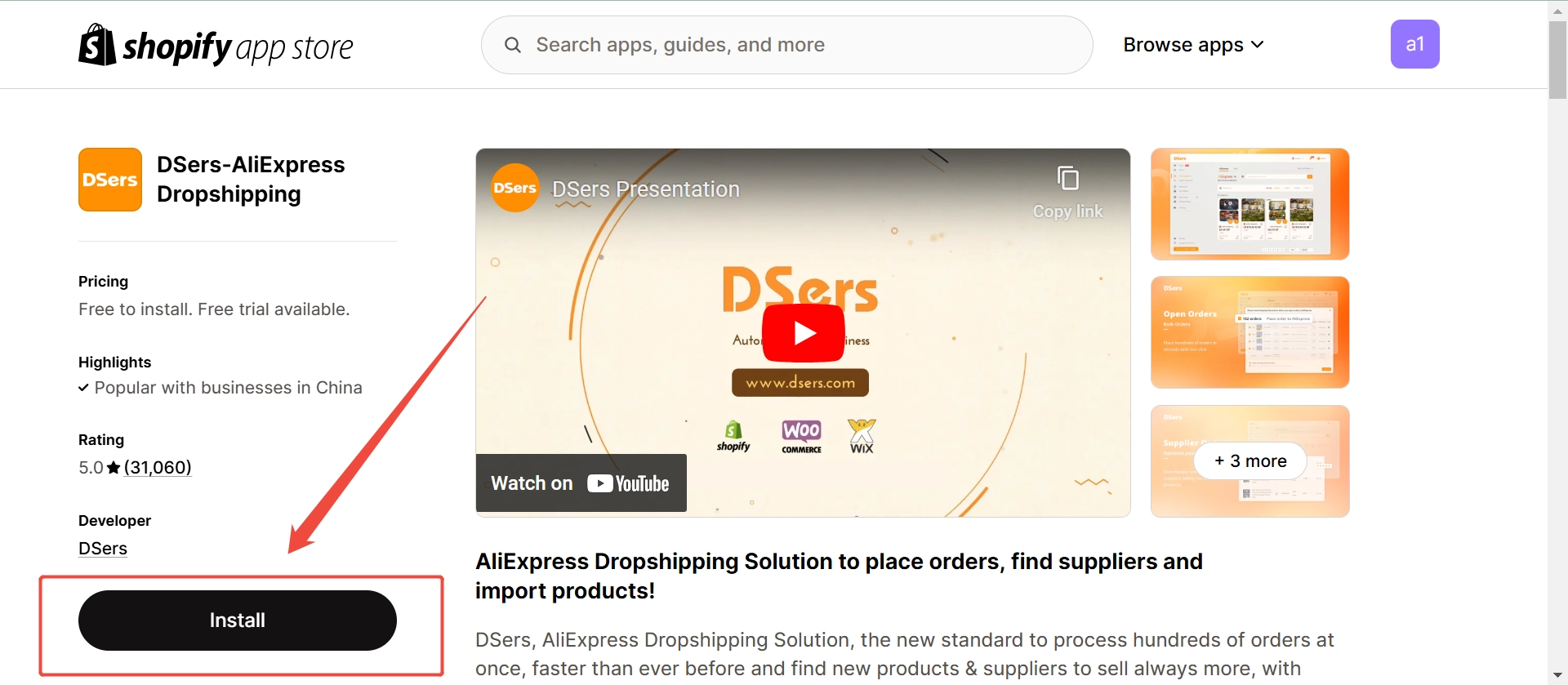
- Log into Shopify Admin
- Go to Apps → Shopify App Store
- Search “DSers”
- Click Install App
Shopify will ask permission.
Click Install.
After approval, Shopify automatically connects your store to DSers.
No coding needed.
Step 2 — Create or Log In to DSers
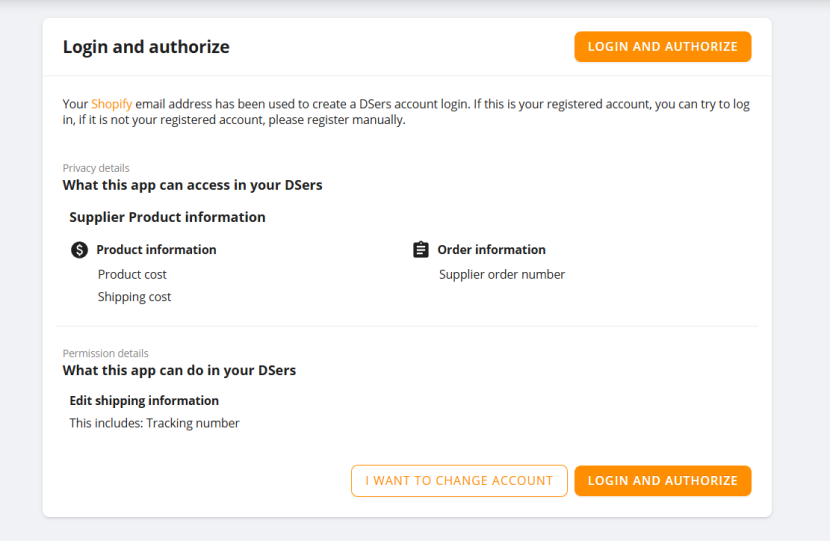
You’ll see options:
- I WANT TO CHANGE ACCOUNT
- LOGIN AND AUTHORIZE
If you already have a DSers account, log in directly.
Choose Free Plan first — it’s enough for beginners.
Step 3 — Confirm Store Binding
Inside DSers dashboard:
Go to Settings → Store Management
Check:
- Store name correct
- Currency correct
- Time zone correct
- Status = Active
If Active → binding successful.
If not → reconnect.
Step 4 — Connect Multiple Stores (Optional)
If you run multiple Shopify stores:
DSers → Add Store → Install again.
One DSers account can manage multiple stores.
Useful for:
- Multiple niches
- Different countries
- Agency businesses
Common Store Binding Problems
❌ Problem: Orders not syncing
Fix:
- Reinstall DSers app
- Check store not disconnected
- Refresh permissions
❌ Problem: Duplicate DSers accounts
Fix:
Use same email for all stores.
Multiple DSers accounts cause confusion.
❌ Problem: Currency mismatch
Fix:
Match Shopify currency with AliExpress currency.
Avoid profit miscalculation.
Connect Your Store with DSers
4. Part 2 — How to Connect Your AliExpress Account
This step allows DSers to place supplier orders.
Without this, DSers cannot function.
Step 1 — Open AliExpress Settings in DSers
Inside DSers dashboard:
Settings → AliExpress Account → Connect.
A new login window opens.
Step 2 — Log In to AliExpress
Use your normal buyer account.
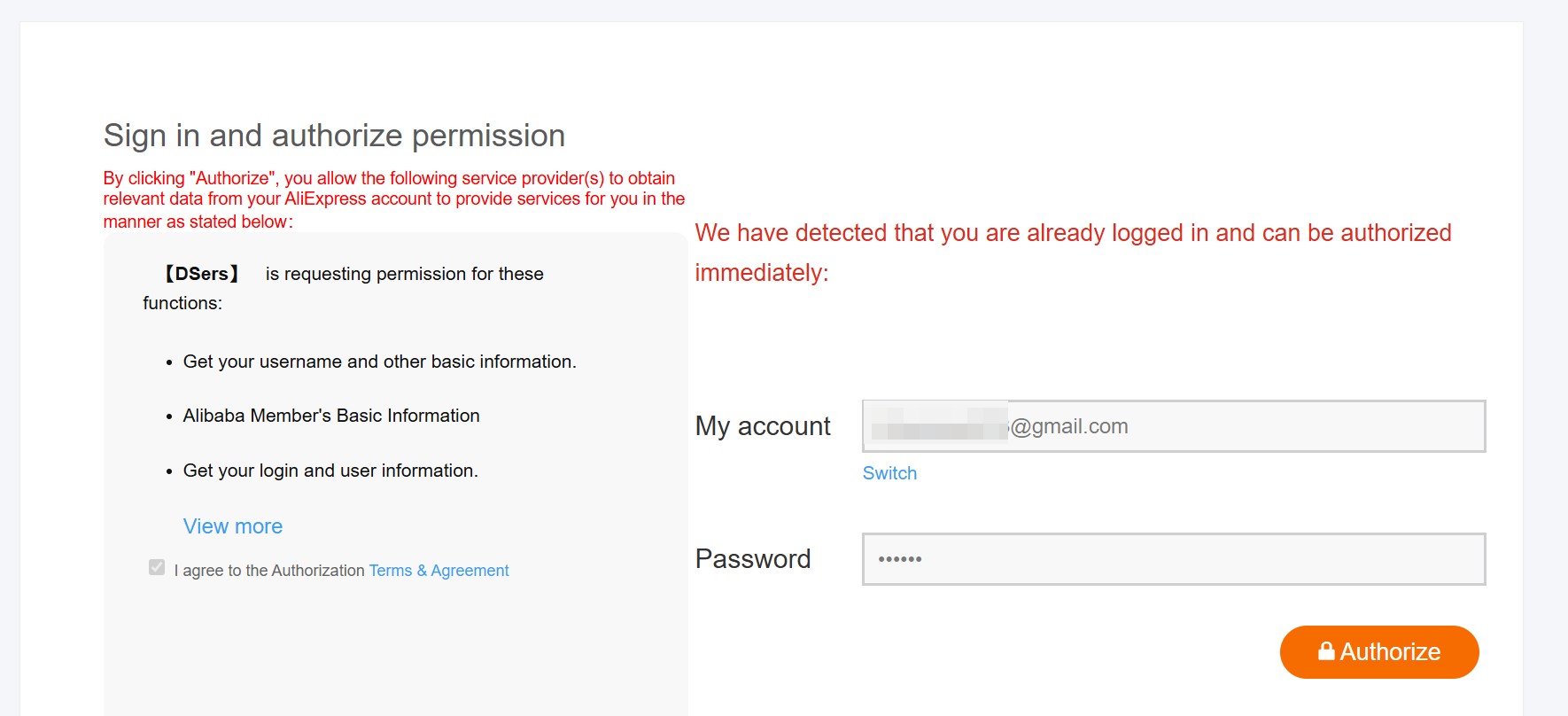
Enter email + password.
Click Sign In.
Then click Authorize.
DSers now gets permission to place orders.
Step 3 — Confirm Connection
Inside DSers → AliExpress Account page.
You should see:
- Account nickname
- Country
- Status = Active
If Active → binding complete.
Step 4 — Install DSers Chrome Extension
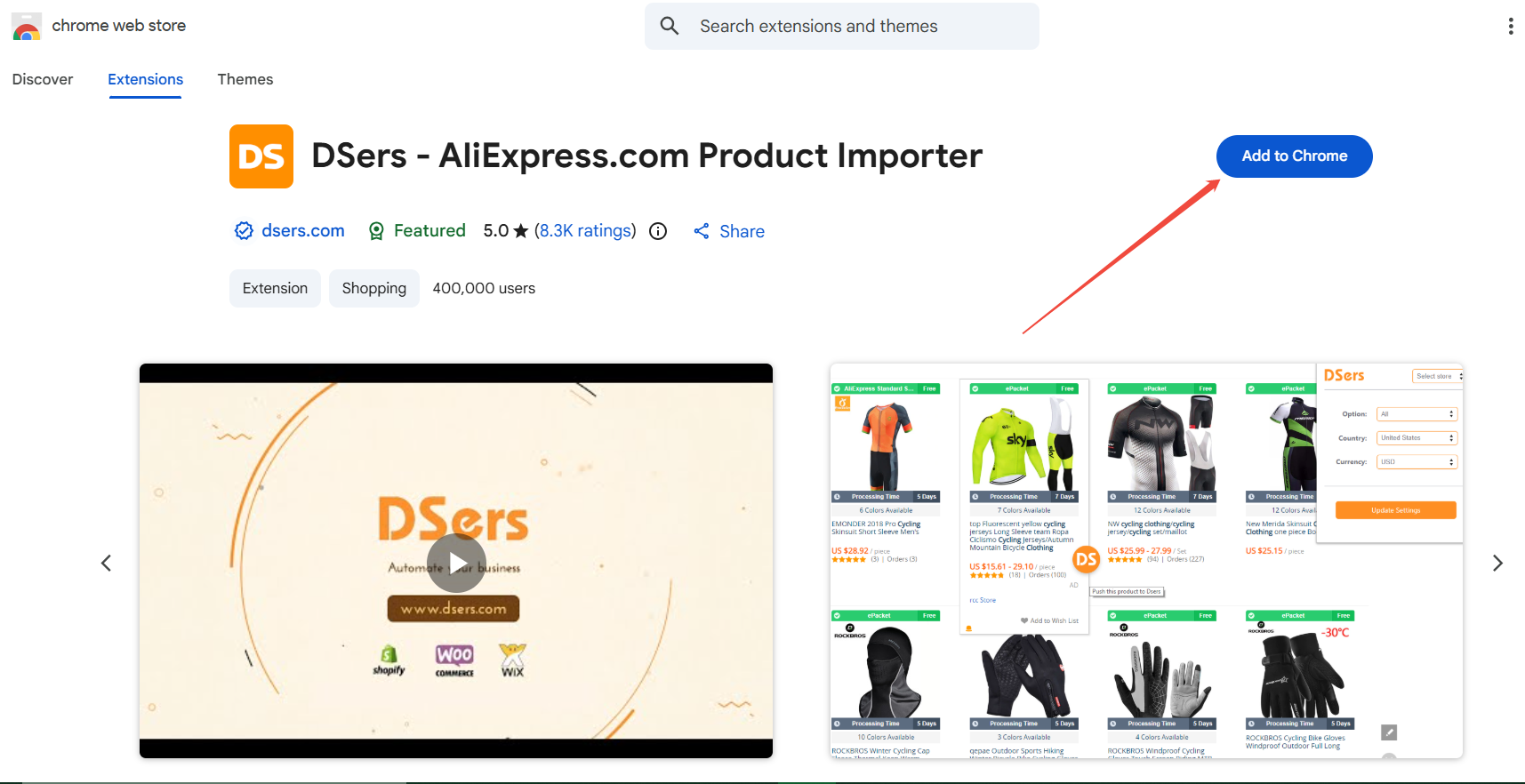
Search “DSers - AliExpress.com Product Importer” on Chrome web store.
Install DSers Chrome Extension.
Log in with same DSers account.
This enables:
- One-click product import
- Faster order placement
- SKU mapping
Without extension, importing is difficult.
Start Managing Orders with DSers
5. How Binding Works Behind the Scenes
Understanding this helps avoid mistakes.
When customer buys:
Shopify → DSers → AliExpress supplier.
Tracking goes back:
AliExpress → DSers → Shopify → Customer email.
So DSers sits in the middle.
If binding fails anywhere, orders fail.
Quick Answer: What Happens After Connecting Your Store and AliExpress Account to DSers?
Connecting your store and AliExpress account to DSers lets DSers act as the workflow bridge between your sales channel and AliExpress suppliers. After setup, you can import products from AliExpress as well as other integrated ecommerce platform, map products to suppliers, place orders in bulk, and sync tracking numbers back to your store. This guide focuses on the AliExpress setup because it is one of the most common first workflows for new DSers users.
Optional sentence:
DSers also supports multiple ecommerce integrations, so the same workflow logic can apply beyond a single store setup.
6. Important Beginner Tips
These tips save money and headaches.
Tip 1 — Use One Browser Profile
Don’t log into multiple AliExpress accounts in one browser.
AliExpress may flag suspicious activity.
Use one account until scaling.
Tip 2 — Match Currency Early
Example:
Store = USD
AliExpress = USD
If mismatched, DSers profit calculation becomes inaccurate.
Tip 3 — Don’t Share AliExpress Account
Shared accounts cause:
- Login conflicts
- Order errors
- Account restrictions
Each operator should have separate account.
Tip 4 — Test Connection Before Importing Products
After binding:
Try importing one product.
If successful → system ready.
| Get Started Now to Grow Your Online Business with DSers! |

7. What to Do After Binding Your Store and AliExpress Account
Once your store and AliExpress account are connected to DSers, you can start building your dropshipping workflow step by step.
- Import products from AliExpress to your store
Use DSers to import products and prepare them for publishing to your store. - Map products to suppliers
Supplier mapping helps DSers understand which supplier or product variant should be used when an order comes in. - Place orders more efficiently
After receiving customer orders, you can use DSers to process supplier orders instead of handling each order manually. - Sync tracking numbers back to your store
Once suppliers provide tracking information, DSers can help sync tracking numbers back to your store so customers can receive shipping updates. - Monitor your fulfillment workflow
After the first setup, continue checking supplier performance, product availability, order status, and tracking updates to keep your workflow stable.
This is why connecting your store and AliExpress account is more than a one-time setup step. It creates the foundation for product import, supplier mapping, bulk order processing, and tracking synchronization inside DSers.
8. Troubleshooting Binding Issues
Here are common problems and solutions.
Problem: AliExpress Shows “Authorization Failed”
Fix:
- Log out AliExpress
- Clear cookies
- Try incognito browser
- Reconnect
Problem: DSers Cannot Import Products
Check:
- Chrome extension installed
- Logged into DSers
- Product page fully loaded
Problem: Store Not Showing in DSers
Fix:
- Reinstall DSers app
- Check store admin permission
- Use correct DSers account
Problem: Tracking Not Syncing
Check:
- AliExpress account connected
- Order placed via DSers
- Supplier added tracking number
9. Security Best Practices
Protect your business.
✔ Enable Two-Factor Login
On Shopify and AliExpress.
✔ Use Strong Passwords
Avoid using same password everywhere.
✔ Check App Permissions
Only authorize trusted apps.
✔ Monitor Orders Daily
Detect errors early.
10. Binding Checklist
Before importing products, confirm:
✔ Store shows Active in DSers
✔ AliExpress shows Connected
✔ Chrome extension installed
✔ Currency matches
✔ Test product import works
Print this checklist.
11. Beginner Workflow After Binding
Here’s your roadmap:
Day 1
- Connect store
- Connect AliExpress
- Install extension
Day 2
- Research products
- Import 10 products
- Edit descriptions
Day 3
- Place test order
- Verify shipping
- Launch ads
This is enough to start.
12. Final Thoughts
Binding your store and AliExpress account is the foundation of your dropshipping system.
If done correctly, DSers can:
- Save hours of manual work
- Reduce order mistakes
- Automate tracking
- Help you scale safely
Connecting your store and AliExpress account is the first step in building a connected ecommerce workflow with DSers. Once the setup is complete, you can move from basic account connection to product import, supplier mapping, order processing, and tracking synchronization.
For new users, this setup creates the foundation for running a more organized dropshipping workflow instead of managing store orders and supplier orders separately. Feel free to explore DSers Help Center to get more information.
Frequently Asked Questions
Here are some common questions about connecting your store and AliExpress account to DSers.
| Get Started Now to Grow Your Online Business with DSers! |



 Live Chat
